Clarifresh offers different license types based on user roles and permissions. These determine the level of access a user has across the web platform and mobile app.
Role Types
There are three user roles and one permission type:
All roles include access to both the mobile app and the web platform.
| Role | Web Platform | Mobile App |
|---|---|---|
| View, edit, approve, and delete inspections | Create up to 20 inspections and view inspections | |
| View, edit, approve, and delete inspections | Create unlimited inspections | |
| View, edit, approve, and delete inspections |
Create inspections and use Computer Vision |
Manager Permission
-
Grants access to build specs and customize system settings
-
Can be assigned in addition to any of the above roles
-
Each new account includes 1 free Manager permission by default
Managing Users and Licenses
Users with Manager permission can add new users and assign(Allocate) them a role or permission.
The ability to assign a specific role depends on whether a license for that role has been purchased and is available.
To manage users Go to Settings > Users
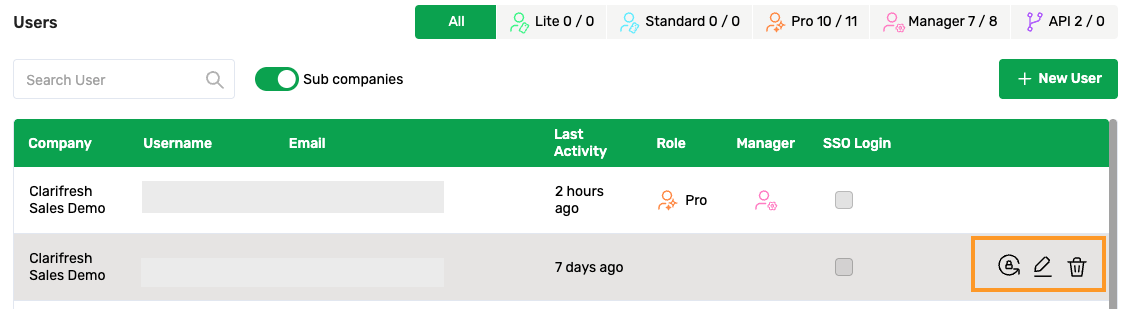
Viewing License Availability
At the top right of the Users screen, you can view the current license availability for each role type.
Each role or permission shows two numbers:
-
Left number: number of users assigned to this role
-
Right number: total number of purchased licenses for this role

User Allocation Guidelines
-
Each user can be assigned one role and optionally a Manager permission
-
If a user is listed without any role, they will not have access to Clarifresh’s web or mobile apps
-
To edit a user’s role or permission, click the edit
in their row